App Store 국가/지역 변경 방법 (iPhone)
대상 국가 Apple ID를 준비하세요. 신규 등록 시 국가/지역을 먼저 고르고 네트워크를 맞춥니다. 그다음 주소 생성기, 기프트 카드, 공식 앱입니다.
업데이트 2026년 10월
From price to subscribe — four steps
From price to subscribe — four steps
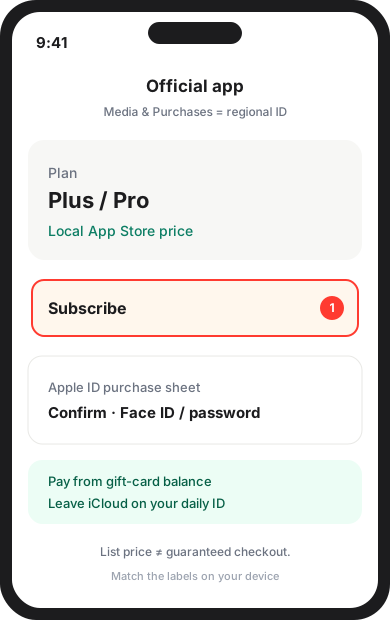
Price first, then a billing address, then the gift card, then the official app. Follow Apple and the app’s terms.
- Pick the product and storefront price — Compare the App Store list. Cheaper is not always easier to check out.
- Fill billing with a format-valid address — Copy street, city, and postal code into Apple’s form. Layout helper — not a real home.
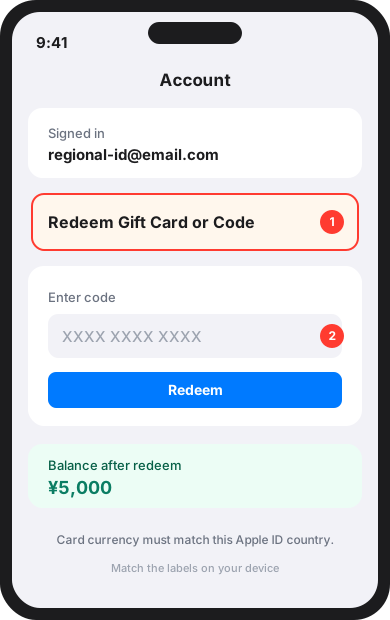
- Buy and redeem a matching gift card — Foreign cards often decline. Redeem the storefront currency onto this Apple ID.
- Switch region and subscribe in the official app — Secondary Apple ID, matching network, then pay inside the app. We do not sell accounts.
권장
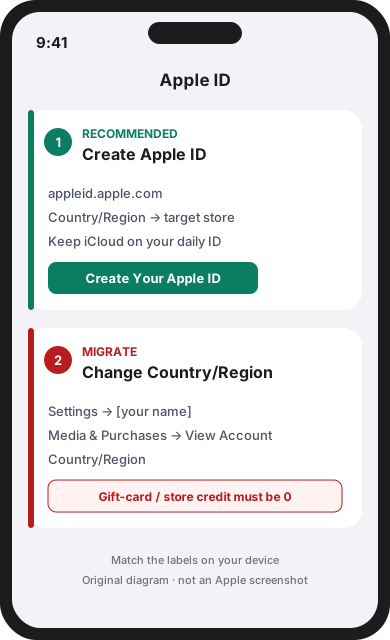
대상 국가의 새 Apple ID 만들기
일상 iCloud는 주 계정에 두고 appleid.apple.com에서 보조 ID를 만들며 국가/지역을 대상 스토어로 설정합니다.
기존 Apple ID 국가 변경
기프트 카드 잔액을 포함한 계정 잔액이 있으면 Apple이 국가 변경을 거절합니다. 구독을 취소하고 기간이 끝난 뒤 변경하세요.
이전할 경우 먼저 완료
- Apple 계정/기프트 카드 잔액을 소진(잔액 0).
- 구독을 취소하고 이미 결제한 기간이 끝날 때까지 기다립니다.
- 예약 주문, 대여, 가족 공유, 환불이 끝날 때까지 기다립니다.
- 새 국가 형식에 맞는 청구 주소를 준비합니다.
설정 → [이름] → 미디어 및 구입 항목 → 계정 보기 → 국가/지역 → 국가 또는 지역 변경
![설정 → [이름] → 미디어 및 구입 항목 → 계정 보기 → 국가/지역 → 국가 또는 지역 변경](/guides/switch-region/step-migrate-settings.svg)
그림의 메뉴 이름은 Apple 현재 경로와 같습니다(설정 → [이름] → 미디어 및 구입 항목 → 계정 보기 → 국가/지역). 기기 표시를 따르세요.
1. Apple ID 준비
보조 ID 신규 생성을 권장합니다.
신규: appleid.apple.com에서 국가/지역을 먼저 선택합니다.
이전: 설정 → [이름] → 미디어 및 구입 항목 → 계정 보기 → 국가/지역.
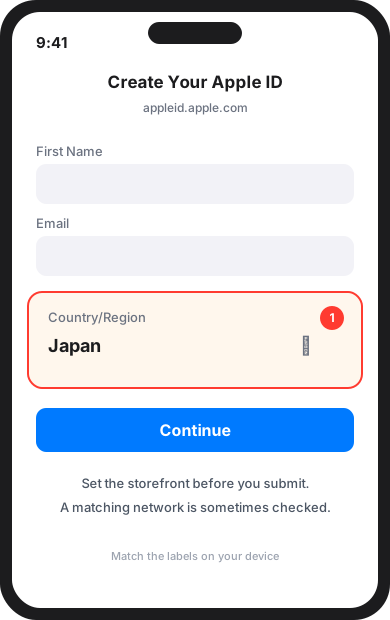
2. 등록 시 스토어 맞추기
생성 폼에서 국가/지역을 대상 스토어로 설정한 뒤 제출하세요.
네트워크 일치 여부를 확인할 수 있습니다. 특정 도구는 필수가 아니며 결제 성공도 보장하지 않습니다.
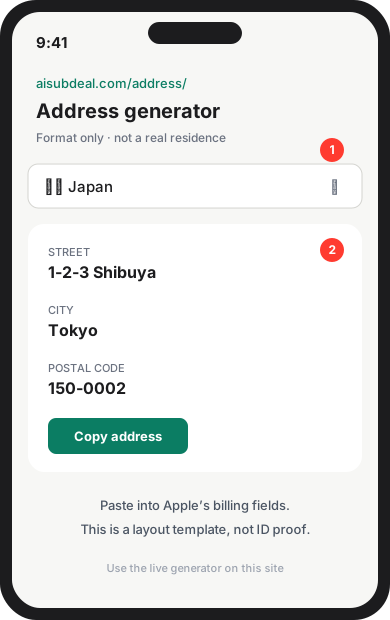
3. 주소 생성기로 청구지 입력
새 국가 형식의 청구 주소가 필요합니다.
주소 생성기는 형식 도우미이며 실제 거주지 증명이 아닙니다.
4. 해당 국가 기프트 카드 사용
해외 카드는 거절되는 경우가 많습니다. 해당 통화 App Store 기프트 카드를 이 ID에 등록하세요.
5. 공식 앱에서 구독
iCloud는 주 ID, 미디어 및 구입 항목만 지역 ID로 로그인하세요. 공식 앱에서 구독. 표시 가격은 결제 보증이 아닙니다.